ClickId: Server-side tracking solution
What it is:
This unique identifier can be implemented through your programmatic partner and does not require a pixel to be placed through your ATS. When a job seeker converts, the ClickId reports and tracks that activity. This option avoids some of the development challenges associated with working with an ATS.
Why you need it:
- Talroo optimizes your job ad placements with the data you communicate back to us. We show your message to the right audiences at the right time, leading to a higher conversion rate and a lower cost per hire.
- No development is required if you’re working with a programmatic partner. Simply tell your programmatic partner that you’d like this feature to be activated, and we just flip a switch. This can avoid the complexity that some conversion tracking efforts require.
Technical Workflow
Talroo utilizes three different conversion endpoints to support tracking of up to three different conversion events. Conversion endpoints:
- Conversion Event 1:
https://www.jobs2careers.com/conversion.php - Conversion Event 2:
https://www.jobs2careers.com/conversion2.php- Conversion Event 2 is the default conversion used for tracking application completed events
- Conversion Event 3:
https://www.jobs2careers.com/conversion3.php
Before implementing ClickId tracking please work with your Talroo POC to determine which conversion event you should use.
Implementation Steps
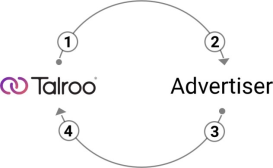
- Talroo appends a unique parameter value,
tlr_sid=XXXX, to your job ad landing URLs.- The
tlr_sidvalue will be a UUID typically 36 characters long - Example of the URL the job seeker hits coming from Talroo (this is the client’s URL with
tlr_sidappended to the job link that the client sent in the feed):www.example.com?tlr_sid=b2719d91-a7b4-4957-8f7b-6b1d8c9b1a26 - Please note that the value held within the
tlr_sidparameter is dynamic and changes for every click from Talroo.
- The
- Advertiser reads the parameter value and associates it with the job seeker session.
- When the job seeker converts, Advertiser makes a GET request to desired conversion endpoint, appending the
tlr_sidassociated with the job seeker session.- Example:
https://www.jobs2careers.com/conversion2.php?tlr_sid=b2719d91-a7b4-4957-8f7b-6b1d8c9b1a26&Link=true - The
Linkparameter on the conversion endpoint allows you to call this endpoint as an API - Please confirm with your Talroo POC which conversion endpoint(s) to use in your candidate journey
- Example:
- Talroo matches conversions (Step 3) to clicks (Step 1) using the
tlr_sidparameter value. (See Diagram below)