Generating an Access Token
After you create an App Client, use it to generate access tokens for the Platform API.
You should use the standard OAuth 2.0 client credentials flow, but we also have an older JSON request.
OAuth 2.0
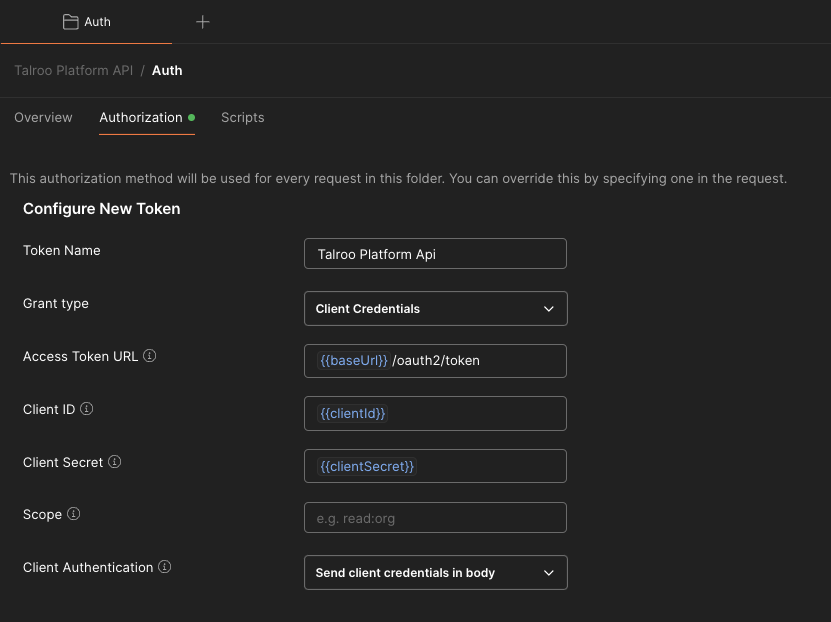
POST to /oauth2/token as application/x-www-form-urlencoded with grant_type, client_id, and client_secret. Scope is also available.
This is what Postman and other OAuth 2.0 clients expect. Set Grant type to client_credentials and send the client credentials in the body OR as a basic http header.
curl --location 'https://api.talroo.com/v5/oauth2/token' \
--header 'Content-Type: application/x-www-form-urlencoded' \
--data-urlencode 'grant_type=client_credentials' \
--data-urlencode 'client_id=<my id>' \
--data-urlencode 'client_secret=<my secret>'
The default request inherits every scope on your App Client. To request a subset, add a space-separated scope value. See Access Scopes.
--data-urlencode 'scope=advertiser location:read'
JSON method
The same endpoint still accepts a JSON body with Basic Auth.
Base64-encode {appClientId}:{appClientSecret} and send it as Authorization: Basic. Include grantType and clientId in the body. scopes is optional; omit it to use every scope on the App Client.
curl --location --request POST 'https://api.talroo.com/v5/oauth2/token' \
--header 'Content-Type: application/json' \
--header 'Authorization: Basic base64({appClientId}:{appClientSecret})' \
--data-raw '{
    "grantType": "CLIENT_CREDENTIALS",
    "clientId": "{appClientId}",
    "scopes": [
            {desiredScopes}
        ]
}'
Example request
curl --location --request POST 'https://api.talroo.com/v5/oauth2/token' \
--header 'Content-Type: application/json' \
--header 'Authorization: Basic NGQzYjA4ajAzb3Bzc3RxNWEyMDdmbmZ2berasdf5ZDBvM2o1aThtcGphMXJmbnQ0dWN2aTlic21ldm50aG12NDVwdHVpNzRwdHJmNWhl' \
--data-raw '{
    "grantType": "CLIENT_CREDENTIALS",
    "clientId": "4d3b08j03opsttq3939fnfvo5",
    "scopes": [
            "advertiser",
            "location:read",
            "category:read",
            "job:status:read",
            "integration",
            "customer:read"
        ]
}'
Response
A successful request returns 200 with a body in this format:
{
    "accessToken": "eyJraWQiOiJzdkVmYnFjTm85U2s0d0doY3FrTlpLcmFBVVNqMCtCZm01ODB5QW95enZNPSIsImFsZyI6IlJTMjU2In0.eyJzdWIiOiI0ZDNiMDhqMDNvcHNzdHE1YTIwN2ZuZnZvNSIsInRva2VuX3VzZS4I6ImFjY2VzcyIsInNjb3BlIjoicGxhdGZvcm0tcHJvZFwvYWR2ZXJ0aXNlciIsImF1dGhfdGltZSI6MTY3NjQxMDk2NywiaXNzIjoiaHR0cHM6XC9cL2NvZ25pdG8taWRwLnVzLWVhc3QtMS5hbWF6b25hd3MuY29tXC91cy1lYXN0LTFfdEVKaVdnOUZjIiwiZXhwIjoxNjc2NDk3MzY3LCJpYXQiOjE2NzY0MTA5NjcsInZlcnNpb24iOjIsImp0aSI6IjdiODFhMjVjLTAxY2YtNDQzOC05YTJiLTFmNzBkMGEyMDU5OSIsImNsaWVudF9pZCI6IjRkM2IwOGowM29wc3N0cTVhMjA3Zm5mdm81In0.FZMppm_IXUecl48eAS_BsK5WX4LOcxdEgk0Ke8RXqrgjnWqqcaqpx7osupb2dZFyPj5v9RPFwM44Ujmab-5qSaSAInBMXOYzC_yPU6EAbOJNgBj0CMzsjPu7NdY2PklGBUdSZuusIdWrWJwDK9xlX4iSjXegWpy_s7FrSOEEuj-z6i3zDwlO5_ykWEC8uO-rKgAm1o7MGcGw8qXJeuO2Cs2PV11HwT1175c1FbhnzyILuc6ErCVck-haHs2V1RbNsxNNqrvqpNTqqueqCDP00YUunlEPRmMwWbq4oGDsIN2NFYVBNl_ksNpzChLlxIoE3OnHXABmANRB_P54nTxvmA",
    "tokenType": "Bearer",
    "expiresIn": 86400
}
Save the accessToken and send it as a Bearer token on later Platform API requests.
Incorrect credentials return 400:
{
  "type": "/errors/bad-credentials",
  "title": "Bad credentials",
  "status": 400,
  "instance": "about:blank"
}