T-Values (Tracking Parameters)
Publisher Best Practices for Traffic Segmentation
T-values (t1, t2, t3) are simple, optional tags you can add to your Talroo traffic links to track 'what worked.' They function like the tracking you may already use with UTM parameters or affiliate SubIDs, but with more flexibility and direct reporting in Talroo.
- What you get: Per-campaign/source/placement performance with clicks and earnings
- Where you see it: Talroo T-Value Reporting API (hourly refreshed)
- Why it helps: Run clean A/B tests, compare sources, and move budget to winners
T-Values vs UTM vs SubID Comparison
| Feature | UTM Parameters | SubID | T-Values (Talroo) |
|---|---|---|---|
| Purpose | Marketing analytics | Affiliate tracking | Flexible performance tracking |
| Common Fields | utm_source, utm_medium, utm_campaign | subid, subid1-5 | t1, t2, t3 |
| Flexibility | Medium (fixed names) | High (vendor-dependent) | High (generic) |
| Reporting | Web analytics | Affiliate dashboards | T-Value Reporting API |
Why T-Values Are Critical for Publishers
- Performance Optimization: Track which traffic sources generate the highest quality traffic
- ROI Analysis: Calculate exact ROI for each traffic segment
- A/B Testing: Test different ad creatives, landing pages, or user flows
- Campaign Attribution: Understand exactly which campaigns drive performance
How to Send T-Values to Talroo
XML Feed Publishers
Original URL:
https://www.jobs2careers.com/click.php?jid=abc123&ri=def456
With T-values (optional):
https://www.jobs2careers.com/click.php?jid=abc123&ri=def456&t1=campaign_name&t2=traffic_source&t3=keyword
API Publishers
GET https://api.jobs2careers.com/api/search.php?
  id=YOUR_PUBLISHER_ID&         # Required
  pass=YOUR_SEARCH_API_PASS&    # Required
  l=Austin,TX&
  q=nurse&
  t1=campaign_456&              # Optional
  t2=source_facebook&           # Optional
  t3=ad_group_healthcare        # Optional
T-Value Specifications
| Property | Value |
|---|---|
| Maximum Length | 32 characters per T-value |
| Encoding | Must be URL-encoded when necessary |
| Parameters | t1, t2, t3 (all optional) |
Common T-Value Usage Patterns
| Parameter | Common Use | Examples |
|---|---|---|
t1 | Campaign | email_2024, social_media, paid_search |
t2 | Source | google, facebook, newsletter |
t3 | Detail | nursing_jobs, remote, entry_level |
Retrieving T-Value Data via API
T-value reporting API requires Talroo permissions. Reach out to obtain credentials.
Authentication
POST https://nv3xq21kwj.execute-api.us-east-1.amazonaws.com/prod/auth
Request Body:
{
  "username": "YOUR_USERNAME",
  "password": "YOUR_PASSWORD"
}
Response:
{
  "id_token": "eyJhbGciOiJIUzI1NiIs...",
  "access_token": "eyJhbGciOiJIUzI1NiIs...",
  "refresh_token": "eyJhbGciOiJIUzI1NiIs...",
  "expires_in": 3600
}
Report Data Endpoint
GET https://0tphaqutzi.execute-api.us-east-1.amazonaws.com/prod/reports/publisher/t_values_date_breakdown
Required Headers:
Authorization: Bearer {ID_TOKEN}
Response:
{
  "data_type": "tabular",
  "data_timestamp": 1759999999,
  "columns": ["Date", "T1", "T2", "T3", "Clicks", "Earnings"],
  "data": [
    ["2022-08-17", "value1", "value2", "value3", 150, 75.50],
    ["2022-08-16", "value1", "value2", "value3", 200, 100.00]
  ]
}
Query Parameters
| Parameter | Type | Required | Description |
|---|---|---|---|
time_range | string | Yes | Time period for data retrieval |
f_t1 | integer | No* | Include T1 values (1=yes, 0=no) |
f_t2 | integer | No* | Include T2 values (1=yes, 0=no) |
f_t3 | integer | No* | Include T3 values (1=yes, 0=no) |
f_publisher_id | string | No | Filter by Talroo feed ID |
At least one T-value parameter must be set to 1 to retrieve data.
Time Range Options
| Value | Description |
|---|---|
thisfull_day | Today's data up to last refresh |
previous_day | Yesterday's full data |
epoch_start~epoch_end | Custom range (see below) |
Custom Time Range
Use UTC epoch timestamps for custom date/time ranges. Data is returned at daily granularity.
Example: time_range=1643882400~1643885999
Returns data between: 2022-02-04 10:00:00 EST and 2022-02-04 10:59:59 EST
Epoch times are UTC, but data reflects EST.
Error Handling
| Status Code | Description | Recommended Action |
|---|---|---|
| 200 | Success | Process returned data |
| 401 | Unauthorized | Refresh authentication token |
| 404 | Not Found | Retry up to 2 times with backoff |
| 429 | Rate Limited | Implement exponential backoff |
| 500 | Server Error | Contact support if persistent |
Response Format
{
  "columns": [
    "Date",
    "T1",      // Only included if f_t1=1
    "T2",      // Only included if f_t2=1
    "T3",      // Only included if f_t3=1
    "Clicks",
    "Earnings"
  ],
  "data": [
    ["2022-08-17", "value1", "value2", "value3", 150, 75.50],
    ["2022-08-16", "value1", "value2", "value3", 200, 100.00]
  ]
}
Retrieving T-Value Data via Dashboard
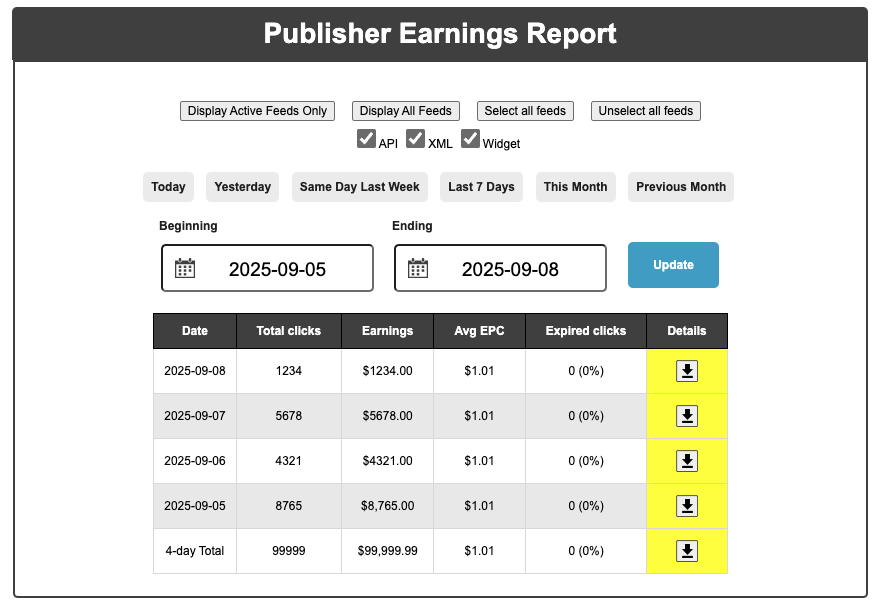
T-values can be obtained from the Publisher Dashboard via the download button. This produces a CSV with columns for T-values (t1, t2, t3) along with other relevant information.
Best Practices for Using T-Values
- Establish Consistent Naming: Use descriptive, standardized patterns
- Optimize API Usage: Call API at 45-minute mark for most recent data
- Efficient T-Value Selection: Only request T-values you need
- Token Management: Refresh tokens before expiration (5-minute buffer)