Earnings Report
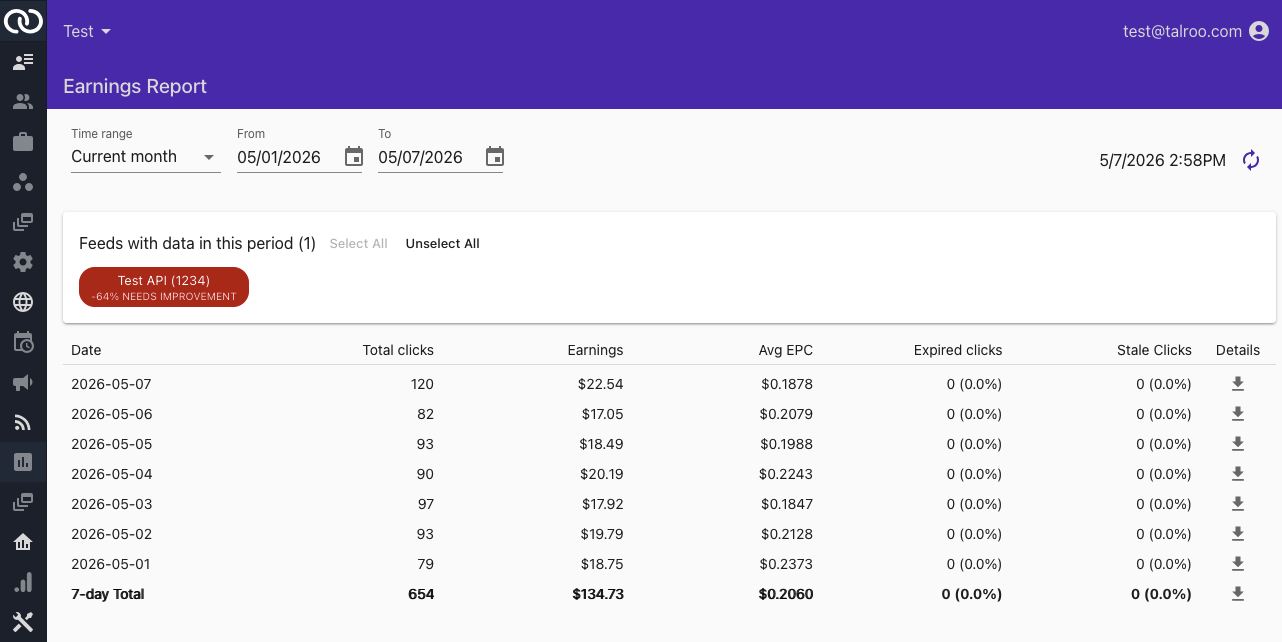
Earnings Report in the left nav of tap.talroo.com is a daily breakdown of feed performance. Filter by date and each feed. Click the download icon on a row for click-level data.
info
See Analytics for more graphs about your feed data
Filters and Refresh
The table and CSV is filterable on time range. Dates are inclusive.
Feeds with Data
The Feeds with data in this period will only display your feeds with data in the selected timerange:
- Clicking on a feed will include/exclude it from the report.
tip
The color and percentage on each chip is the feed's current Quality Score. See Quality Score.
Table Columns
| Column | Description |
|---|---|
| Date | Calendar day in TAP's timezone |
| Total clicks | Clicks for that day and the selected feeds (including expired and stale) |
| Earnings | Dollars attributed for that slice |
| Avg EPC | Earnings per click (Earnings / Total clicks) |
| Expired clicks | Count and percent of clicks to expired inventory. Expired clicks. |
| Stale clicks | Count and percent of latent clicks. Stale clicks |
| Details | Download arrow Download click-level details for the day/total. |
Downloadable Report Columns
| Column | Description |
|---|---|
| time | Timestamp that a click occurred (EST) |
| expired | Whether the click was counted as expired |
| stale | Whether the click was counted as stale |
| referrer_url | Source domain or host you attributed via the referrer parameter, see Referrer. |
| click_state | US state the click came from |
| t1 | tracking tag See Tracking |
| t2 | tracking tag See Tracking |
| t3 | tracking tag See Tracking |
| conv | timestamp (EST) for a conversion event |
| conv2 | timestamp (EST) for a conversion event |
| conv3 | timestamp (EST) for a conversion event |
Conversions
You cannot categorize conversions by the conv, conv2, conv3 columns. Each job may use any/none of them for any conversion type.